Skip to content
PiBye

For lawyers, immigration consultants and accountants

Use AI on client files without sending client details to the cloud.

PiBye swaps names, IDs and addresses for tokens on your Mac. You approve the copy, your AI works on it, and PiBye puts the real names back.

See it work on your own documents before you pay.

Free to try: your first 10 documents · then $99 CAD once, with 12 months of updates

1.0.2 · macOS 14.8.5 or later · Apple Silicon · 1.1 GB

Signed and notarized by Apple · Install steps

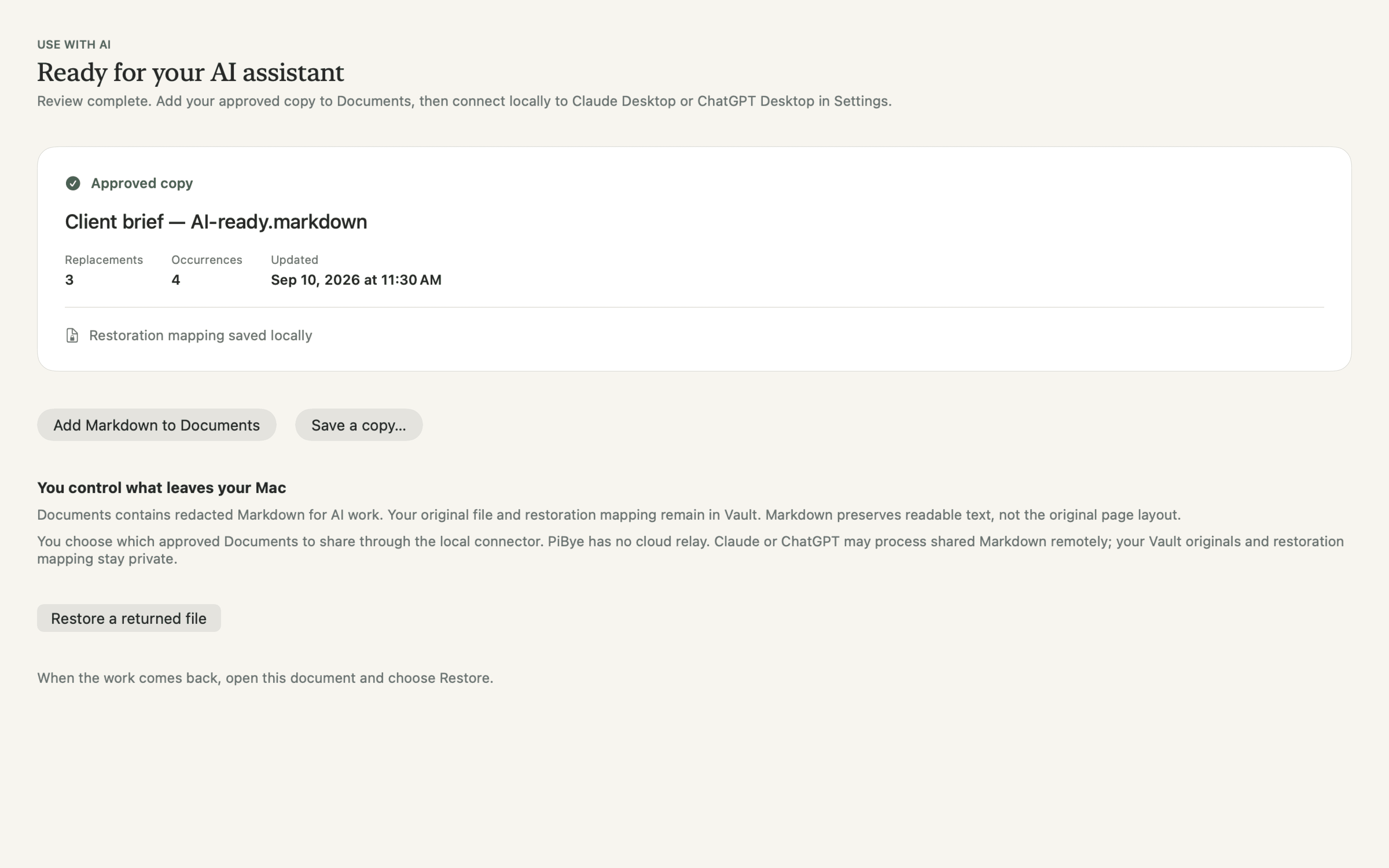
The real PiBye screens with fictional client details: drop in a document, approve each replacement, work with your AI, restore the names.

The problem

The AI sees the case, not the client.

AI can summarize, draft and cross-check in minutes. But pasting a client file into an assistant hands a cloud provider your client’s name, address and ID numbers.

So you either skip the speed-up or take a risk you would rather not. PiBye gives you the speed-up without the exposure: the AI gets a reviewed copy with identities swapped out, and you get the real names back in the finished work.

1 · Your original, on your Mac

Prepare a project summary for Amelia Rousseau.

2 · The copy your AI sees

Prepare a project summary for [PERSON_001].

3 · The finished work, names restored

Project summary for Amelia Rousseau.

How it works

Three steps, all on your Mac.

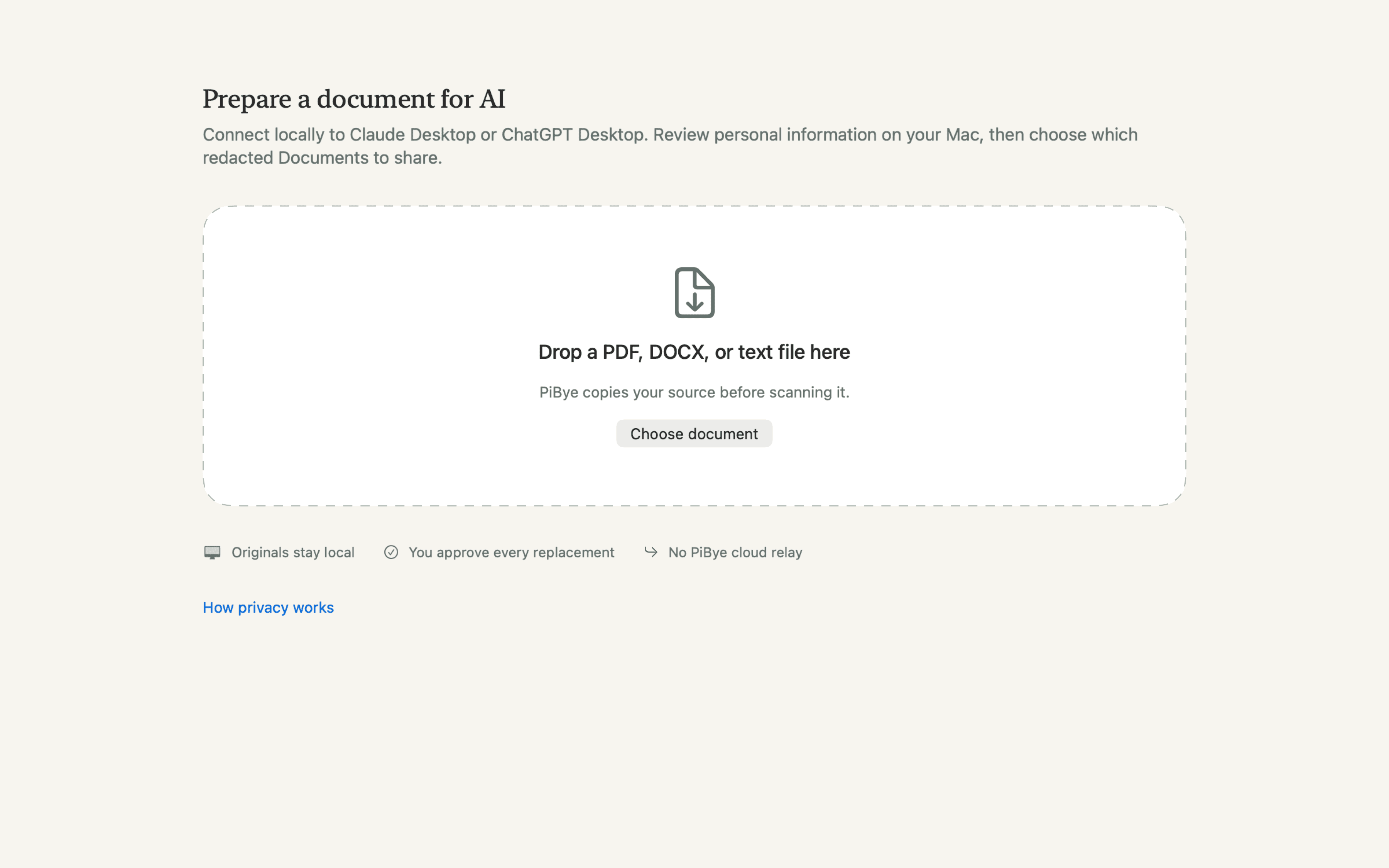
  1. PiBye import screen: drop in a document

    Redact locally

    Drop in a PDF, Word file, scan or text file. PiBye finds names, ID numbers, addresses and more, and swaps them for tokens like [PERSON_001], all on your Mac.

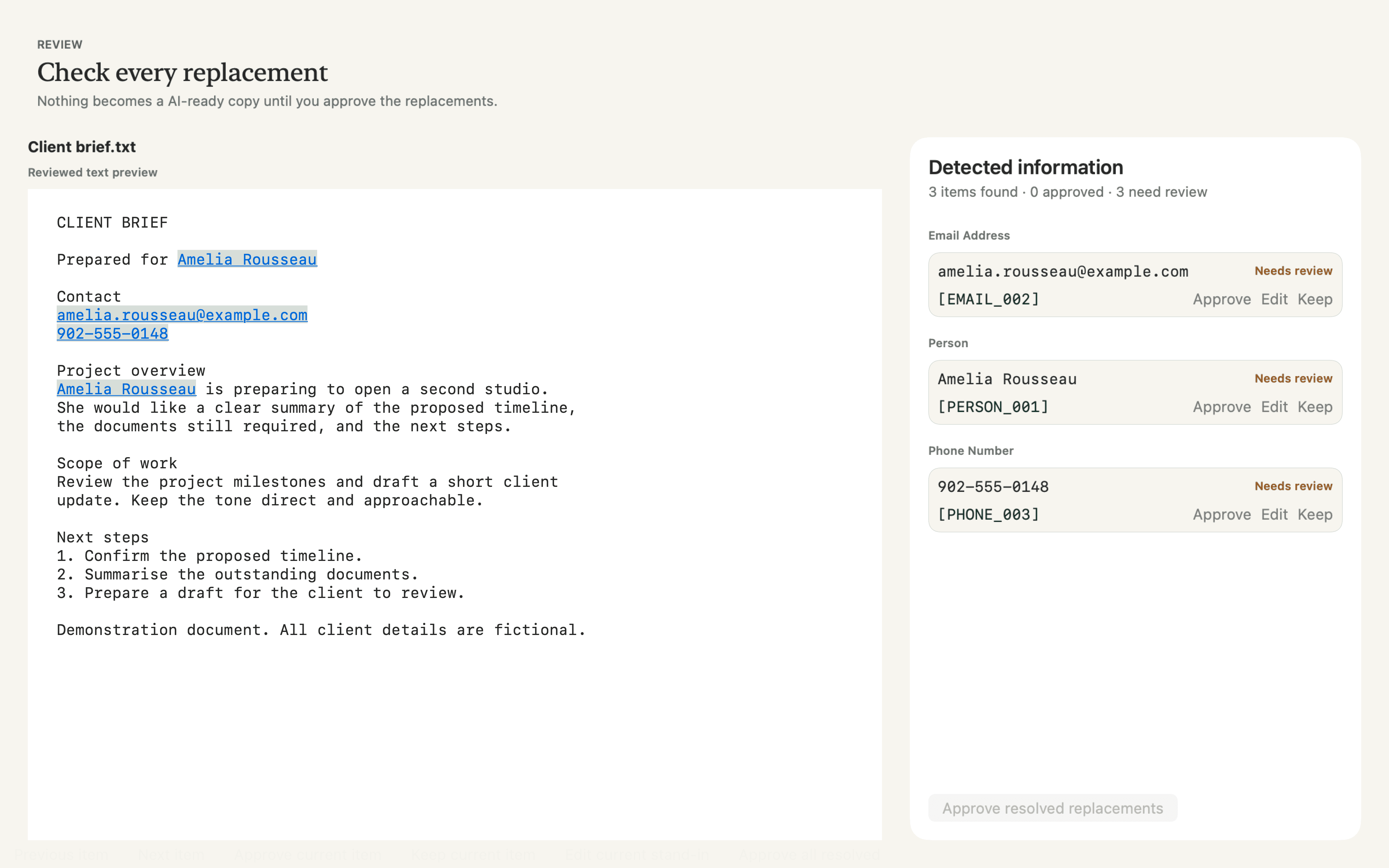
  2. PiBye review screen listing detected details with Approve, Edit and Keep

    Review and approve

    See every replacement in context. Approve, edit or keep each one. Nothing is shared until you approve the copy.

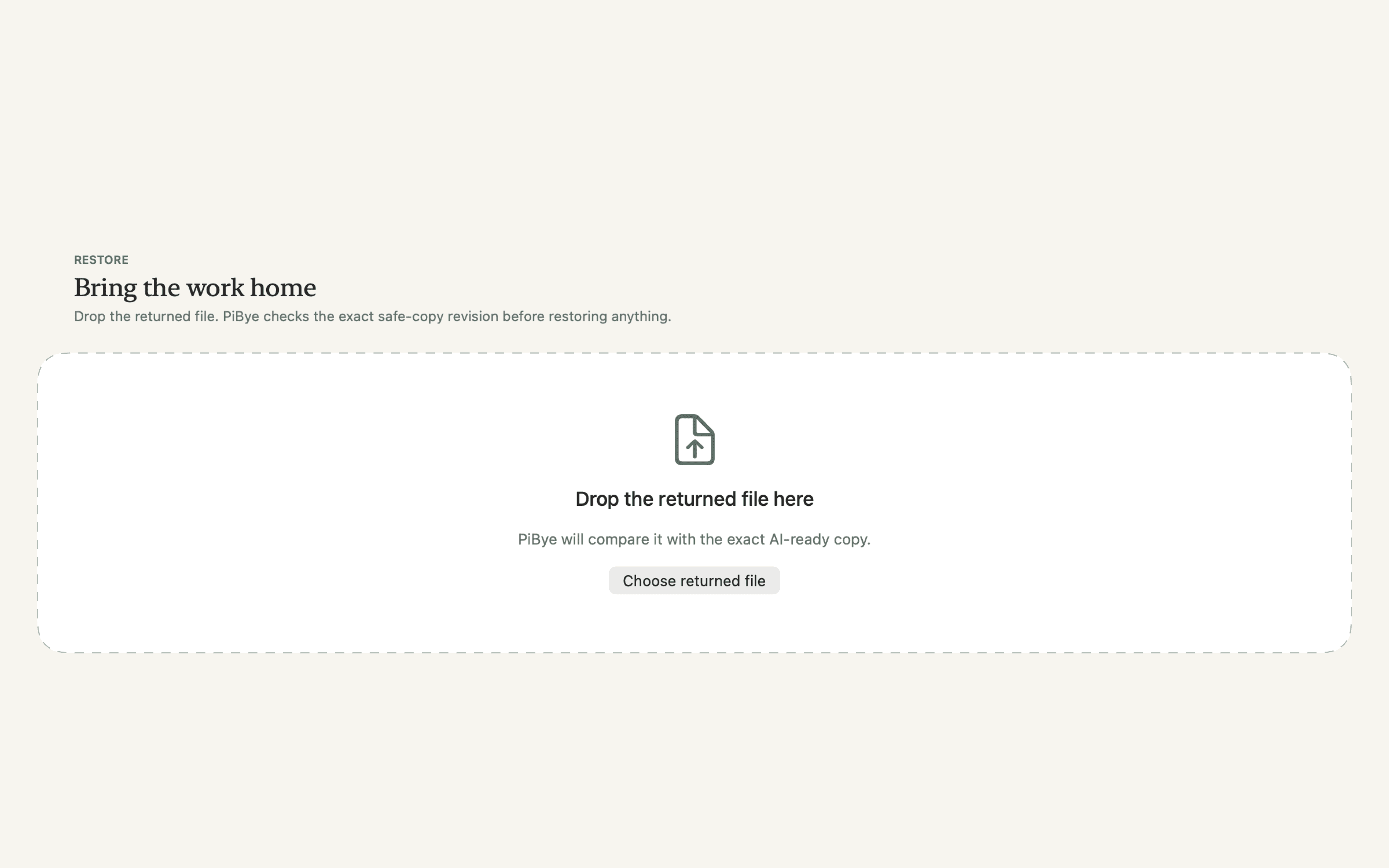
  3. PiBye restore screen for bringing the AI’s finished work home

    Work with your AI, names restored

    Your assistant works on the approved copy. When its draft comes back, PiBye puts the real names back in, in a separate file.

Real PiBye screens with fictional sample data.

Who it’s for

Built for people who keep other people’s secrets.

Lawyers

Summarize a file, draft a letter or review a contract with AI, without client names in the chat.

Immigration consultants and RCICs

Work through applications and narratives with UCI, passport and IRCC file numbers replaced.

Accountants and bookkeepers

Draft client letters and check statements with names, SINs and addresses swapped out.

Anyone else who handles confidential client documents will find it useful too.

What you get

Everything for the whole round trip.

Your documents

PDF, Word (DOCX), text files and scanned PDFs, read with on-device OCR.

Your AI

Claude Desktop and the ChatGPT desktop app read the approved copies you choose through a local connection. Or paste the copy into any assistant.

Names put back

Bring the AI’s finished document home and PiBye restores the real names into a separate file.

You stay in charge

Approve, edit or keep every replacement. Nothing is shared until you say so.

Lock PDF

Turn completed forms into static copies you can send clients to check.

Runs on your Mac

Detection and OCR are built in. No account, no page limits, no PiBye cloud.

How to connect Claude Desktop or the ChatGPT desktop app

Also included · Lock PDF

Send clients a static copy of the form you completed.

Lock PDF prints every answer into the page and removes the fillable fields, so clients can check their answers without changing or clearing anything. Drop in one form or a whole file; your fillable originals stay untouched.

It works on forms that only show “Please wait…” outside Adobe Reader, including many Canadian immigration forms, and it all runs on your Mac.

How Lock PDF works

Proof

Tested on real documents. Results published.

We measure PiBye in the open, including what it misses.

real public documents run through the test battery
50,119
real public documents run through the test battery
identifiers found by independently written checks
84,037
identifiers found by independently written checks
still readable afterwards, all counted and published
24
still readable afterwards, all counted and published
filled with 6,000+ planted identifiers in a second test, still running
1,360 forms
filled with 6,000+ planted identifiers in a second test, still running

These are tests on public documents and synthetic forms, not on yours, so you review every copy before it is shared. Read the full test record

Pricing

Try it free, then buy it once.

See it work on your own documents before you pay. No account, no subscription.

Free to try

$0first 10 documents

  • Your first 10 documents, on the house
  • Everything works: redact, review, restore, Lock PDF
  • Claude Desktop and the ChatGPT desktop app
  • No account, no card, no time limit
Coming soon

Requires a Mac with Apple Silicon.

PiBye licence

$99CAD, one-time

  • Unlimited documents, on one Mac
  • 12 months of updates included
  • Renewing updates is optional (39 CAD a year); the app keeps working either way
  • No account, no subscription

The licence arrives by email. How the free trial works

A document counts once, when PiBye first prepares it. Already-prepared documents, saved matters, Restore and Lock PDF are never blocked. The count stays on your Mac.

Plain and honest

What PiBye does and doesn’t do.

What it does

  • Your original documents never leave your Mac. Anything you choose to share with an assistant has already been redacted and reviewed by you.
  • Replaces names, ID numbers, street addresses, postal and ZIP codes, dates of birth, cities and employers with tokens.
  • Keeps the key to the real names on your Mac, so only you can restore them.
  • Helps you reduce what an AI provider ever receives.

What it doesn’t do

  • Detection can miss things, which is why you review the whole copy before sharing.
  • Province or state, amounts and generic occupations stay visible by design, because the work usually needs them. A rare job title or unusual amount can still point to one person, so check those.
  • The copy is pseudonymized, not anonymous, and photos and faces are not hidden. It does not replace your own judgment on confidentiality and consent, and it is not a compliance certification.
  • Lock PDF copies are not password-protected and are not for submitting to IRCC. IRCC needs its forms validated in Adobe Reader.

Read the full product limits

FAQ

Questions people ask first.

Straight answers on where files go, what you approve, and how names come back.

All questions

How does the free trial work?

Download PiBye and use it. Your first 10 documents are free, with everything switched on: redact, review, restore, Lock PDF and the Claude Desktop and ChatGPT desktop app connections. A document counts once, when PiBye first prepares it. There is no account, no card and no time limit, and free users still receive updates.

What happens after 10 documents?

When you go to prepare an 11th document, PiBye asks you to buy a licence: $99 CAD one-time, which unlocks unlimited documents and includes twelve months of updates. Nothing you already have is taken away: documents you have already prepared, your saved matters, Restore and Lock PDF are never blocked.

Does PiBye send my documents anywhere?

No. Your original documents never leave your Mac: PiBye prepares and restores them locally and has no cloud relay. Anything you choose to share with an assistant has already been redacted and reviewed by you. When you enable the optional local connection to Claude Desktop or the ChatGPT desktop app, that assistant can read the approved Markdown Documents you select and submit generated Markdown for review. Your AI provider processes whatever you share with it, remotely.

Do I approve the replacements?

Yes. Each item can be approved, edited or kept. Required items must be resolved before you explicitly approve the final copy. A document with no detected items still needs your approval.

How is PiBye tested?

Against real documents and planted identifiers, and the results are published. The first battery ran 50,119 real public documents; independent checks found 84,037 identifiers and 24 were still readable after redaction; all 24 are counted and published, and they are number-shaped values from court filings. A second battery on harder material (completed forms, handwriting, French and Spanish) is still running and is not finished. Neither battery proves your document is clean: review every approved copy before sharing it.

How do I use PiBye with my AI?

Two ways. Copy the approved text into any AI chat, or connect Claude Desktop or the ChatGPT desktop app locally so they can read the approved copies you select. The connection runs on your Mac with no PiBye cloud relay, and the key to the real names never leaves your Mac. Your AI provider still processes what you share, which is the case with names and identifiers already replaced.

How do I restore returned work?

Open the same Document, choose the approved copy you shared, and drop the returned file into Restore. Review found and missing stand-ins, resolve any differences, then approve the final restoration. PiBye saves a separate restored file in the private Vault and preserves supported new text.

Can PiBye lock a fillable PDF form?

Yes. Lock PDF is built for sending completed forms to clients for review. It saves a static copy of each filled-in PDF form with every answer printed into the page and the fillable fields removed, so the client can check the answers but cannot retype, clear or reset them. The copy is saved beside the original as “(static).pdf”, and the original is not changed.

Is this a compliance certification?

No. PiBye's local processing and review controls are product behavior, not a certification or a guarantee that a particular use meets your professional obligations.

What if I stop renewing?

Nothing breaks. PiBye keeps working, with unlimited documents, exactly as before. You simply stop receiving new versions until you choose to renew for $39 CAD, which adds another twelve months of updates.

Use your AI on client work. Keep your clients out of it.

Download PiBye free, try it on your first 10 documents, and see the review step for yourself.

Free to try: your first 10 documents · then $99 CAD once, with 12 months of updates

1.0.2 · macOS 14.8.5 or later · Apple Silicon · 1.1 GB